
How to check a Dubai project in the Dubai REST app: completion percentage, escrow account, Oqood and brokers, step by step
Written by Usama Haj Yahia, founder of U810 Properties
Last updated:
In Dubai REST, the official app of the Dubai Land Department, you can check for yourself, for free, how much of a project has been built, when the construction site was last inspected, which escrow account you are paying into, and whether your contract is registered in Oqood. In the guide How to check a developer, I explained what to check before you sign. Here, I will show you how to do this in the app itself, screen by screen, and what else you can check there: a broker, the rental index and the service charge index.

In short
- The Project Status (Mashrooi) service shows the completion percentage and the inspection date. You can also download an inspection report and view photos from the construction site, along with the developer details and the escrow account details.
- The Title Deed Verification service checks the Title Deed, and for a property still under construction, it checks the Oqood registration by contract number.
- The app also lets you check a broker's card, the rental index and the building's service charge index.
This guide covers Dubai. In other emirates, the authorities, fees and rules are different. See the comparison of Dubai, Abu Dhabi and Ras Al Khaimah.
In this guide
What you can check in Dubai REST
| What you check | The service in the app | What you see | When it is useful |
|---|---|---|---|
| Construction progress | Project Status (Mashrooi) | Completion percentage, inspection date, inspection report and photos | Before you sign, and every time a payment request arrives |
| The escrow account | Project Status | The bank and the project's account details | Before every money transfer |
| Your registration | Title Deed Verification | Whether the Title Deed or the Oqood contract is valid | After you sign, and after handover |
| The broker | Validate E-Card | That the card was issued by RERA, and for which activity | Before you work with a broker |
| Rent | Rental index | The average rent for similar properties | When you plan to rent the property out |
| Service charges | Service charge index | The rate approved for the building | Before you buy, and to check a bill from the developer |
Step by step: Project Status
- Download Dubai REST from the App Store or Google Play. The app is available in English and Arabic.
- In the bottom bar, tap Services, and choose Project Status (Mashrooi) from the list.
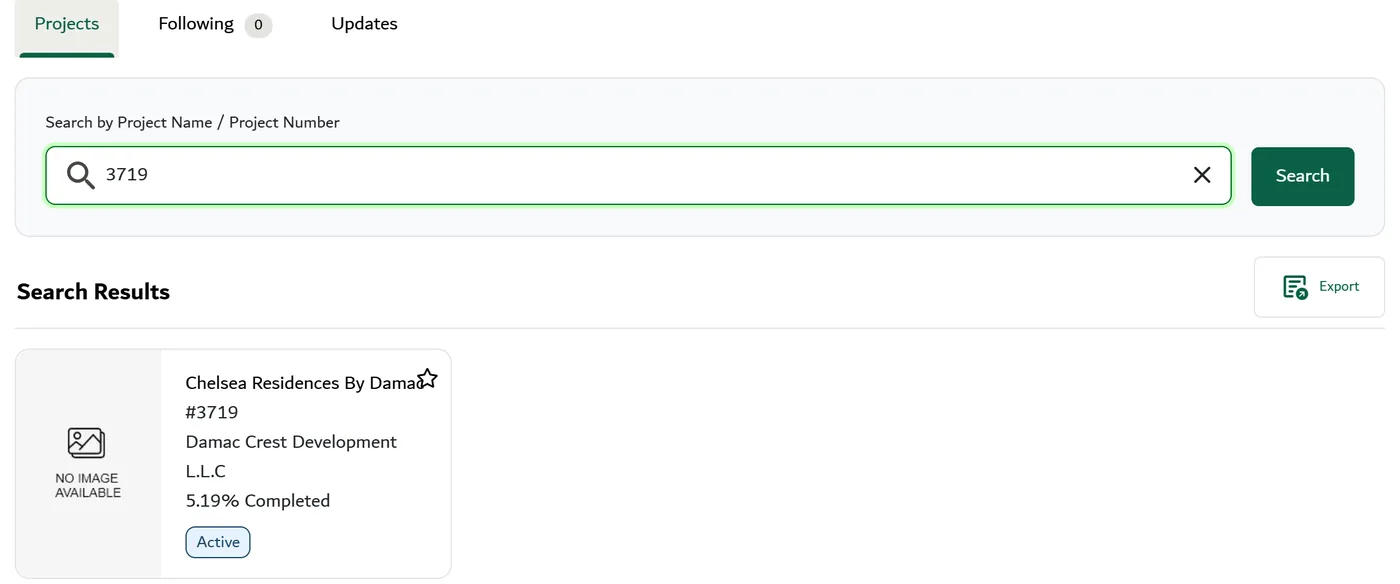
- Search for the project by name and select it from the list. Each project is marked as active, completed or cancelled.
- The project page shows the project number, the status, the developer details and the escrow account details.
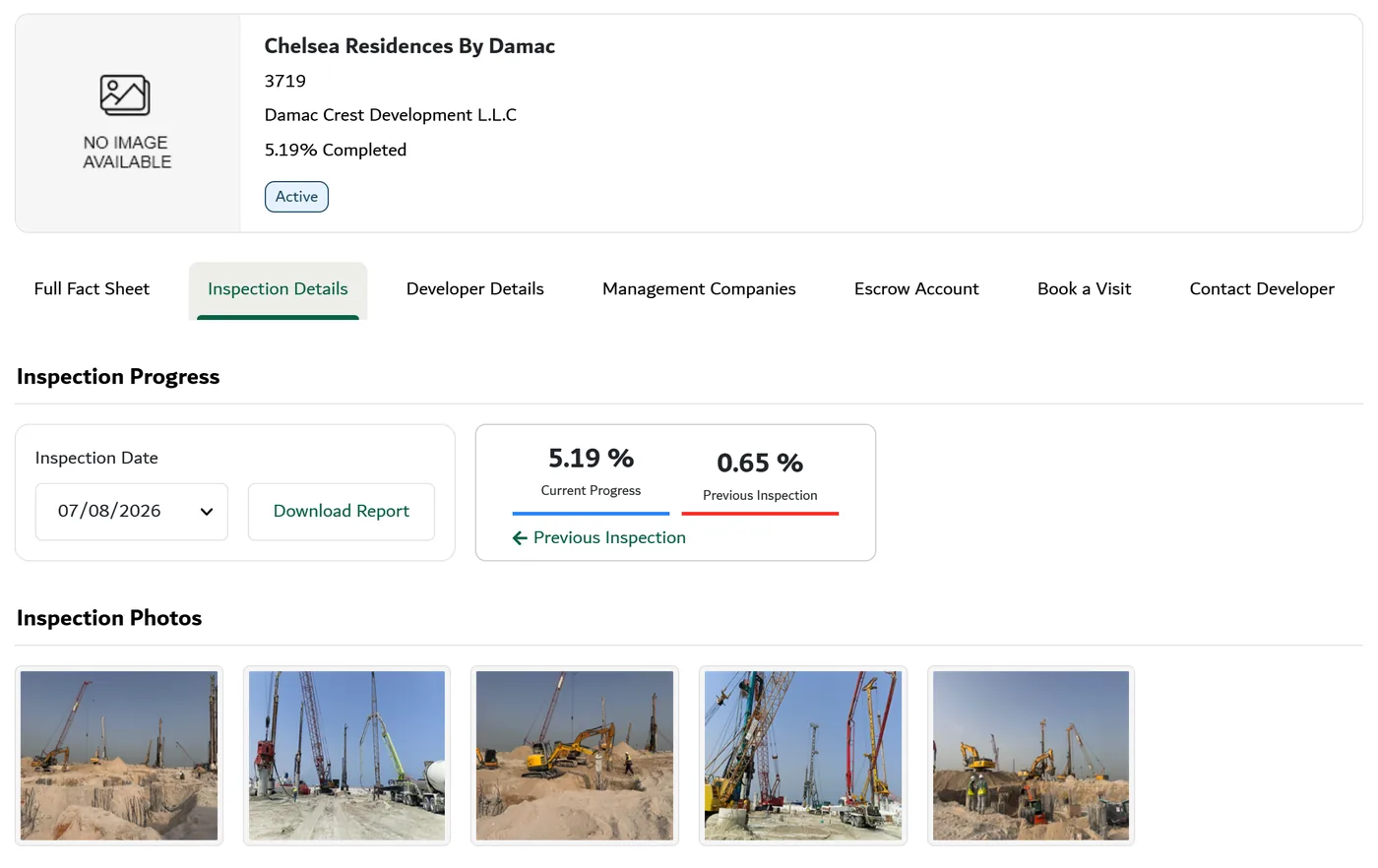
- Next to the completion percentage, on the image of the building, there is an arrow. It opens the inspection details: the inspection date, the inspection report to download, and photos from the construction site.
- If you want to visit the construction site, fill in your name, email and phone number in the "Book a Visit" form, and the developer will get back to you.
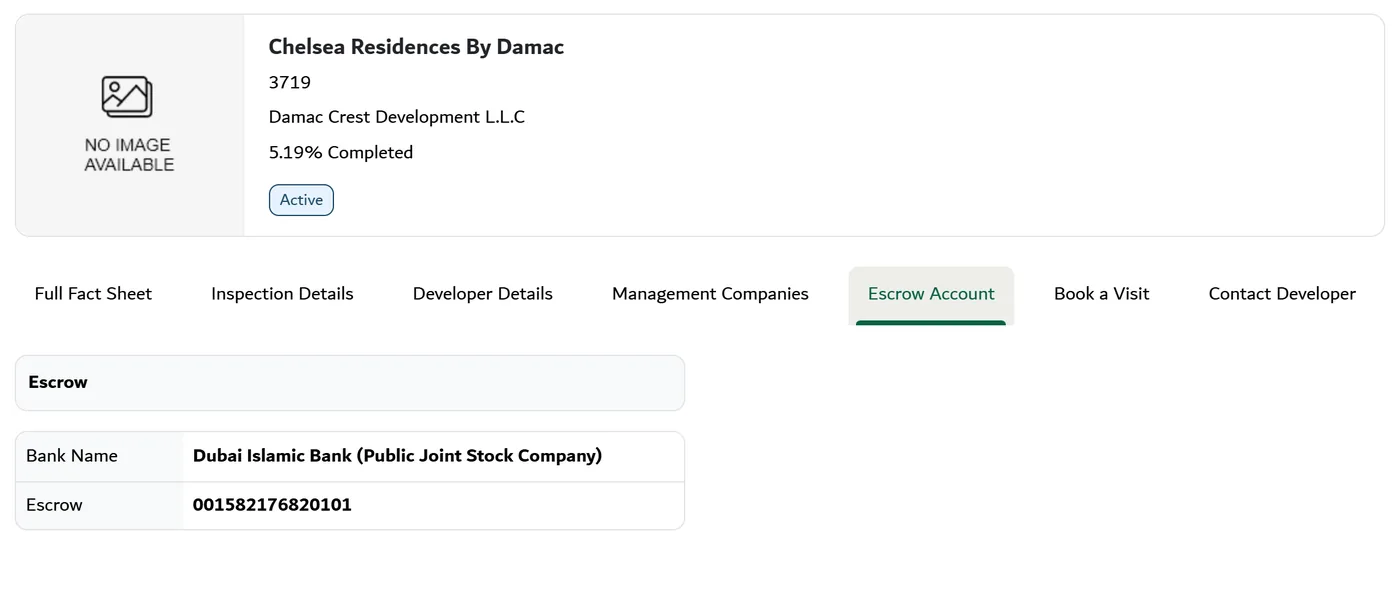
This is how it looks on the Dubai Land Department website, in the Project Status service. The same information appears in the app. The example is Chelsea Residences, project 3719, captured on 13.10.2026.
How to read what you see
- The completion percentage belongs to a specific date. The percentage appears together with the date of the inspection in which it was measured. So look at the date first: a percentage from a few months ago does not tell you what is happening today. For example, for the OceanZ project listed on this site, the Land Department figure showed 50.04%, as of 25.08.2026.
- The inspection report and the photos. You can download the report, and the photos come from the inspection at the construction site. It is worth saving a screenshot of the percentage and the date every time you make a payment linked to construction progress.
- Dates. The project page shows the registration date, the construction start date and the expected completion date. Compare the expected date with the handover date in your contract.
- The escrow account. The bank and account number in the app should match what is written in the payment instructions and in the contract. A request to transfer money to a different account is a reason to stop and ask (the full explanation is in the guide How to check a developer).
Checking Oqood and the Title Deed
- In Services, choose Title Deed Verification.
- Choose one of two options: checking the property only (Validate Property), or checking the property and the owner's name (Validate Owner and Property).
- Enter the Title Deed number and its year, which are written under the barcode on the deed, and the property type (apartment, villa or land). When checking the property and the owner, also add the owner's name.
- For a property still under construction: instead of the Title Deed number, enter the Oqood contract number and its year.
- Tap Validate, and the result appears on the screen.
When it is useful: after the developer has registered the contract, to make sure the purchase is registered, and after handover, to make sure the Title Deed has been issued (see the guide Handover day in Dubai).
Checking a broker
Before you work with a broker, ask for their card number. In Services, choose Validate E-Card, choose the card type and enter the number. The result shows whether the card was issued by RERA, and for which activity. The app also has a list of brokers and brokerage offices.
The rental index and the service charge index
- The rental index: shows the average rent for similar properties in the same area. You can search by Title Deed number, by tenancy contract number (Ejari), or by area, property type and number of rooms. It helps you plan a rental without relying on prices in listings. The index does not guarantee any particular rent.
- The service charge index: shows the service charge rate approved for the building, by year. Before you buy, search by project name or on the map, with no title deed number needed. Searching by title deed number is for those who already hold a title deed. Check the index again when a service charge bill arrives from the developer or the management company (see the guide to the costs).
What the app does not tell you
- It does not rate developers, and a high completion percentage is not a promise of a handover date.
- It does not replace the contract. The handover date, the grace period and compensation for delay are written only in the contract.
- It covers Dubai only. A project in Ras Al Khaimah or Abu Dhabi is checked with a different regulator (see the comparison between the emirates).
What we check together
With every investor I guide, we go through the project in the app together before signing, compare the escrow account with the payment instructions, and check that the contract has been registered in Oqood. After the first consultation call I can give you a quote. It depends on the sale process and the services you need.
Frequently asked questions
Does the app cost money?
No. You download it for free from the App Store or Google Play.
Do I need to register to see a project's status?
No. In my experience, you can open Project Status and see the project's status without logging in and without opening an account.
What do I do if the percentage in the app is lower than what I was told?
Save a screenshot with the date, and ask the developer in writing. If the handover is already delayed, see the section on handover delays in the guide How to check a developer.
How do I use the Dubai REST app to check a property's Title Deed?
In Services, choose Title Deed Verification, then enter the Title Deed number and its year, which are printed under the barcode on the deed, and the property type. To check the owner as well, add the owner's name. Tap Validate, and the result shows the property's details and its status, for example whether it is mortgaged. When you buy a resale property, checking with the owner's name helps you confirm that the seller is the registered owner.
How do I check that my contract is registered in Oqood?
In Title Deed Verification, use the Oqood contract number and its year instead of the Title Deed number.
Where can I see what the service charges in a building are?
You can find this in the service charge index, either in the app or on the Dubai Land Department website.
Sources
- What the app shows (completion percentage, photos, escrow account number, rental index, service charge index, list of brokers): DLD, Dubai REST; DLD, frequently asked questions (the service charge index and brokers in the app) (checked 13.10.2026).
- Navigating Project Status (Services, Project Status, search by name, active/completed/cancelled, developer details, escrow account, the arrow to the inspection details, report to download, photos, registration, start and expected completion dates, Book a Visit): DLD, Project Status service guide (PDF); Gulf News, updated 12.08.2023 (checked 13.10.2026).
- The OceanZ figure (50.04%, 25.08.2026): DLD report, as on the project page on this site.
- Title Deed Verification (Services, the two options, number and year under the barcode, property type, Validate, the result and the property status): DLD, service guide (PDF); Bayut, updated 21.09.2026; Property Finder, updated 16.01.2026 (checked 19.11.2026).
- The Oqood contract number and year instead of the Title Deed number: Bayut, 21.09.2026; Property Finder, 16.01.2026 (checked 19.11.2026).
- Broker card verification (Validate E-Card, RERA cards by type of activity): DLD, service guide (PDF), list of services; DLD, Validate E-Card (checked 13.10.2026).
- The rental index in the app and on the website, and searching by Title Deed, Ejari or area: DLD, Dubai REST; Property Finder, 01.08.2026 (checked 13.10.2026).
- The service charge index in the app and on the website: DLD, frequently asked questions; Gulf News, updated 13.02.2026 (checked 13.10.2026).
- The service charge index, three ways to search: DLD, Service Charge Index; Gulf News.
- No official rating of developers, escrow account: the sources of the guide "How to check a developer" on this site (checked 13.10.2026).
- You can see a project's status without logging in: my own experience, 2026.
This information is general and correct as of the update date. The services in the app can change, so check the Dubai Land Department website as well.
Checking a project in the app? Send me the project name, and we will go through what it shows together.
Send a WhatsApp messageChecking a project in the app?
Send me the project name, and we will go through what it shows together.
Send a WhatsApp messageRelated guides
6 more related guides
- How to check a developer in Dubai before you buy off-plan
- Pushy salespeople in Dubai: how to protect yourself
- 6 mistakes investors make when buying in Dubai, and what to do instead
- Buying a resale apartment in Dubai: the process, the costs and what to check before you sign
- Buying an apartment in Dubai with a spouse or partner: ownership, visas and what happens later
- What is true and what is not: things people hear about buying in Dubai